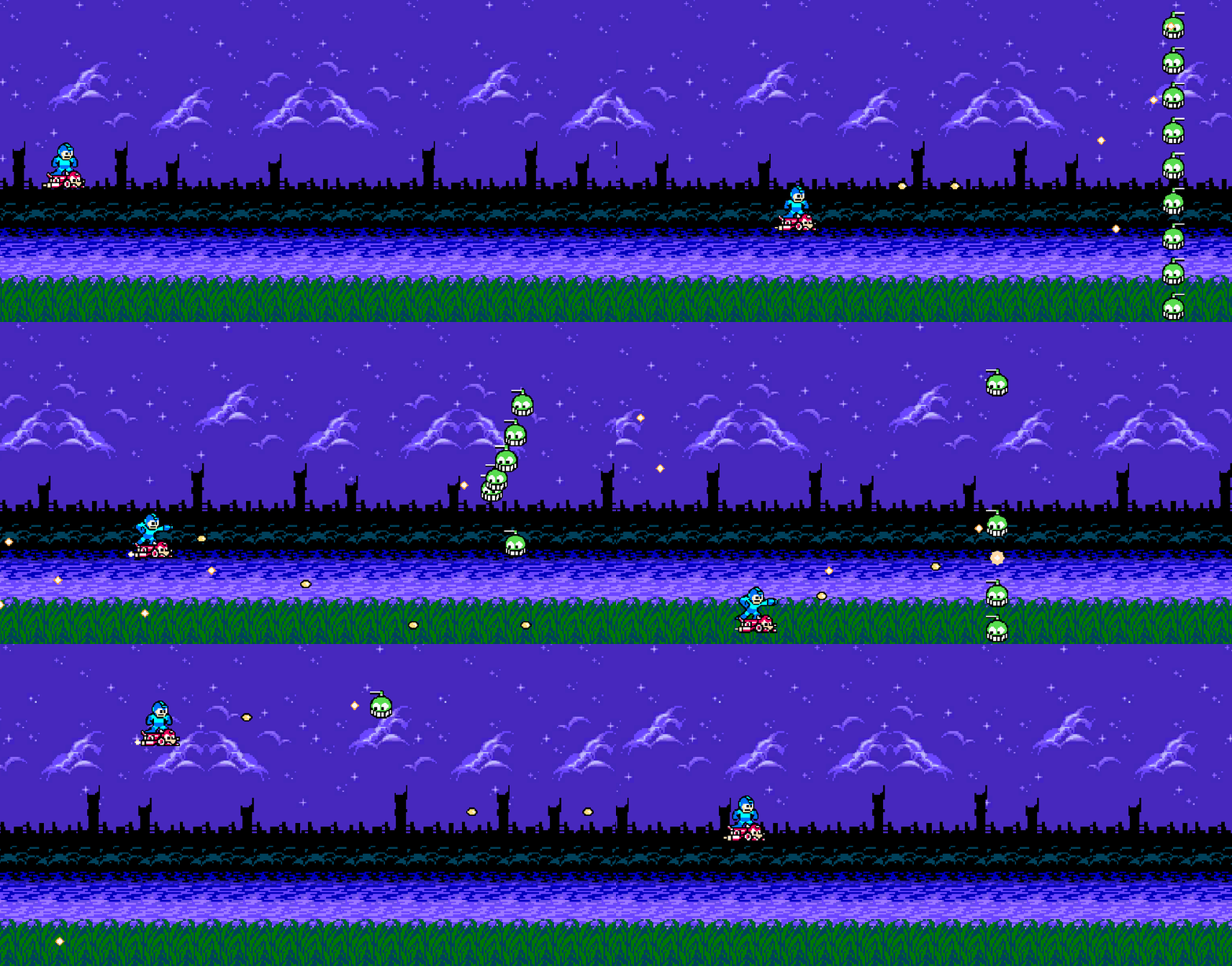
I swear I got hit on purpose.
Bug Fixes
Firing too much!
While testing, I discovered more bullets were firing from Mega Man’s gun than should be. If I mashed the fire button quickly 5 times, several more than 5 bullets would come out.
The problem was that in my weapon controller, the coroutine responsible for auto-shooting was only checking to see if the shoot action was in progress. If I’m mashing the button, there is a significant likelihood that even though I’m not holding, I might just happen to be pressing it when the coroutine checks. This keeps the auto-shoot coroutine going when it should’ve exited earlier. Not only that, but these coroutines can begin to stack up, so if I mashed the fire button followed by holding it down, I would have several coroutines auto-firing, yielding a stream of bullets.
At first I though maybe I could track an _isAutoFiring bool, but that would largely suffer the same issue. I really needed to differentiate between coroutines, and exit out of it if we’ve released the key. The only way I could think of doing this is tracking an “auto shoot ID,” and only continue auto-shooting in a coroutine if the current auto-shoot ID matches the one we had when we entered the coroutine.
That… sounds complex, but it really isn’t so bad. Minor tweaks:
private Guid? _autoShootId;

private void ShootStart(InputAction.CallbackContext context)
{
    _autoShootId = Guid.NewGuid();
    StartCoroutine(AutoShoot());
}

private void ShootStop(InputAction.CallbackContext context)
{
    _autoShootId = null;
}

private IEnumerator AutoShoot()
{
    var autoShootId = _autoShootId;
    while (_shootAction.inProgress && autoShootId == _autoShootId)
    {
        yield return new WaitForSeconds(autoShootInterval);
        if (_shootAction.inProgress && autoShootId == _autoShootId)
        {
            CreateBullet();
        }
    }
}
Now the coroutine only creates bullets and continues along if the autoShootId matches the one we had when we entered. Seems to work! I don’t particularly like the solution though, so we’ll see if I can think of a better one later.
Dead enemies shooting?!
I noticed that after I killed an enemy, it would fire one more shot. This one was simple: there was nothing guarding the instantiation of the bullet after the coroutine finished waiting. A simple check on its health seemed to suffice:
while (true)
{
    yield return new WaitForSeconds(
        Mathf.Clamp(
            Random.Range(averageFireRate-1f, averageFireRate+1f), 1f, 3f));

    if (health > 0)
    {
        Instantiate(bullet, transform.position, Quaternion.identity);
    }
}
Encounters
I’d been thinking about how to do this all week. Any implementation I do, I wanted a few conveniences built into the plumbing:
- Easy way to script a chain of actions.
- Actions should be re-usable.
- Generic way of attaching those actions to an enemy.
Basically, I want code to be reusable. I don’t want to have to re-script the same sort of thing (e.g. enemy moving from position A to position B). After a few iterations, I created a namespace, which I had to learn about though it’s similar to packages in Java, which I’ll make objects responsible for scripting enemy movement in.
Each action an enemy takes will be a coroutine. When one finishes, it executes the next in sequence. For now, I’ll only have two actions:
- Enemy moves from to a new position at a given speed.
- Enemy holds at position for a specified time.
At some point, the enemy will have a collection of actions, so an interface is necessary:
public interface IEnemyAction
{
    IEnumerator Action(GameObject enemyObject);
}
With this interface, I can implement my two actions.
Wait is just a simple yield for a time period:
public class Wait : IEnemyAction
{
    private readonly float _waitTime;

    public Wait(float waitTime)
    {
        _waitTime = waitTime;
    }

    public IEnumerator Action(GameObject enemyObject)
    {
        yield return new WaitForSeconds(_waitTime);
    }
}
Moving to a position is a wee bit more challenging, but still pretty simple. I had to discover that yield return null is like waiting for the next frame, so movement works exactly like within Update here:
public class MoveToPosition : IEnemyAction
{
    private readonly Vector2 _destination;
    private readonly float _speed;

    public MoveToPosition(Vector2 destination, float speed)
    {
        _destination = destination;
        _speed = speed;
    }

    public IEnumerator Action(GameObject enemyObject)
    {
        var isComplete = false;
        while (!isComplete)
        {
            var step = _speed * Time.deltaTime;
            var newPosition = Vector2.MoveTowards(
                enemyObject.transform.position,
                _destination,
                step);
            enemyObject.transform.position = newPosition;

            if (newPosition == _destination)
            {
                isComplete = true;
            }

            yield return null;
        }
    }
}
The next step was to make an encounter game object, with a script inside of it. This script would be responsible for spawning the enemies and setting up their actions. However, this script will need a list of enemies. In an effort to make this generic in the future, ideally I’d like a dictionary from enemy name to prefab. There’s no built-in way to do this in Unity’s inspector, but after some discussion with Gemini, we can use a generalized struct to get effectively the same result:
[System.Serializable]
public struct StageEnemy
{
    public string name;
    public Enemy enemy;
}
And then in my stage script, we’ll have a serialized field StageEnemy[]. Then, we can easily set things up in the inspector:
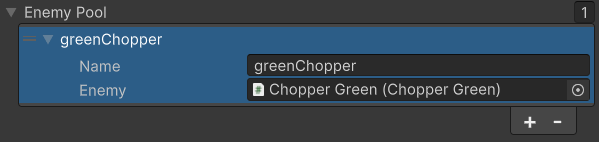
Then, from the array, I can make a Dictionary in Awake, and I have the convenient collection that I desired.
Before I can complete this script, we need a way to pass actions to the enemies. So, in our base Enemy class, I added a few things:
private IEnemyAction[] _actions;

void Start()
{
    OnStart();
    if (_actions != null)
    {
        StartCoroutine(ExecuteActions());
    }
}

protected virtual void OnStart()
{
    // Does nothing by default.
}

private IEnumerator ExecuteActions()
{
    foreach (var action in _actions)
    {
        yield return StartCoroutine(action.Action(gameObject));
    }
}

public void SetActions(params IEnemyAction[] actions)
{
    _actions = actions;
}
I learned that Awake happens when an object in instantiated, but Start doesn’t occur until the next frame. Thus, I have time to set the actions before Start occurs. However, my implementation of Enemy (ChopperGreen) already had Start, so Enemy.Start wasn’t getting called. Hence, I had to create a virtual OnStart method and update the implementation to use that instead of Start.
Once all that plumbing is done, we can finally begin scripting the encounter. The plumbing is extremely important, because it’ll make scripting other encounters much easier. They all pull from a generic framework and I only have to write the encounter itself next time, not all the plumbing (at least I hope).
[SerializeField] private int encounterCount;
[SerializeField] private StageEnemy[] enemyPool;

private readonly Dictionary<string, Enemy> _enemies = new();

private void Awake()
{
    foreach (var enemy in enemyPool)
    {
        _enemies.Add(enemy.name, enemy.enemy);
    }
}

private void Start()
{
    StartCoroutine(NineRight());
}

private IEnumerator NineRight()
{
    List<Enemy> aliveEnemies = new();
    for (var i = 1; i <= 9; i++)
    {
        var y2 = 10 - i;
        var enemy = Instantiate(_enemies["greenChopper"], new Vector2(19, i), Quaternion.identity);
        enemy.SetActions(
                new MoveToPosition(new Vector2(16, i), 4),
                new Wait(3),
                new MoveToPosition(new Vector2(11, y2), 4),
                new Wait(3),
                new MoveToPosition(new Vector2(6, i), 4),
                new Wait(3),
                new MoveToPosition(new Vector2(1, y2), 4));
        aliveEnemies.Add(enemy);
    }

    while (aliveEnemies.Count > 0)
    {
        yield return new WaitForSeconds(1);
        aliveEnemies.RemoveAll(enemy => enemy.IsDestroyed());
    }
}
For now, there’s only one encounter. In the future, I’ll have a List<System.Func<IEnumerator>> and I’ll randomly pick one, wait for the player to complete the encounter, then start the next one up to the encounterCount. We only have one, so I didn’t write that part, but it should be a relatively simple addition.
Up Next
More enemies! More encounters! The fun stuff.
Eventually, I want to track health visually on the screen, and provide a death animation.
 Learning Unity 2D
Leave a comment