Nothing visually interesting to show off this week since the bulk of work has been cleaning up the back-end and experimenting with Unity events. I did fix two things though:
- Rush now flips horizontally with Mega Man. Hmm, though now I think about it, maybe he shouldn’t since the background is moving forward… well, whatever.
- When Mega Man’s invulnerability ends, any objects he’s currently on top of weren’t colliding. This means if there were a large boss or something, as long as the player stayed on top of the boss, they’d never take damage. I needed to reset the collider by disabling it, waiting a frame, and then enabling it.
Other than that, the rest is refactoring but retaining existing functionality. First, events.
Events
When Mega Man dies, enemies keep firing at where he should be. I don’t really like this; they should stop firing. However, constantly detecting if Mega Man is alive or now is inefficient. Instead, enemies should get an event whenever he dies and stop firing as a result.
On top of that, I wanted to externalize his health (and in the future, weapon inventory and lives) so it can carry over from scene to scene. If the health is externalized, then whenever he takes damage, I should be able to send out an event so Mega Man knows he needs to trigger the damage animation and go invulnerable for a period, and the UI needs to know to reduce his health bar.
Given these use cases, the first step is creating a singleton for his health. To do that, I had to learn C#’s singleton pattern, relative to Java’s. It seems like they provide some syntax to help out, so that’s good. Anyway, the basic object:
public class PlayerStats : MonoBehaviour
{
    [SerializeField] private int maxHealth;

    private int _currentHealth;

    public static PlayerStats Instance { get; private set; }

    private void Awake()
    {
        if (Instance == null)
        {
            // Set the instance only once, and do not destroy it.
            Instance = this;
            DontDestroyOnLoad(gameObject);
            _currentHealth = maxHealth;
        }
        else
        {
            // Another scene tried to create this, so destroy the duplicate (this new one).
            Destroy(gameObject);
        }
    }
}
Cool, cool. Now, whenever Mega Man takes damage (and only the collider on his game object will know this), we need to call a method in this new singleton to send out events to any subscribers. There are two events I want here:
- Damage taken.
- Dead.
The damage taken event will send out the current and max health, specifically for the UI to be able to calculate the percentage left. For death, there is no info other than he’s dead. So, we add this to our new singleton:
[System.Serializable]
public class PlayerDamageEvent : UnityEvent<int, int> { }

public class PlayerStats : MonoBehaviour
{
    [SerializeField] private PlayerDamageEvent onDamageTaken;
    [SerializeField] public UnityEvent onDeath;

    public void TakeDamage(int damage)
    {
        _currentHealth = Mathf.Max(_currentHealth - damage, 0);
        onDamageTaken.Invoke(_currentHealth, maxHealth);

        if (_currentHealth <= 0)
        {
            onDeath.Invoke();
        }
    }
}
Now we need subscribers.
For damage taken:
- Update the health in the UI.
- Trigger Mega Man’s hit animation and invulnerability.
For death:
- Explode.
- Disable things like shooting.
- Enemies stop firing.
For updating the health in the UI, our HealthController already has everything, so we just need to add the method to the event on the persistent data. For triggering Mega Man’s invulnerability, I got rid of all the health tracking in Mega Man’s controller script (more on this later) and just end up calling a method that starts the coroutine for his invulnerability.
However, we still need to call our method in the singleton responsible for sending the event out. Only the collider’s trigger method knows how much damage we’ve received, so it has to call the method:
PlayerStats.Instance.TakeDamage((int) damage);
Now, for the death, it’s pretty easy for the exploding and disabling. We already had a Die() method in Mega Man’s single script, so we just invoke that to knock out two birds with one stone.
For enemies to stop firing, it’s slightly more complex. Because they are prefabs that get instantiated, we have to create a method to disable attacking, and add that method as a listener to the death event. Fortunately, that’s all quite simple:
private void Start()
{
    PlayerStats.Instance.onDeath.AddListener(OnPlayerDeath);
    ...
}
And when that method is called, we simply stop the enemy’s attack routine. Easy peasy.
Overall, events will be very powerful. I plan to use them constantly in the future.
Component Refactoring
Having one single MonoBehaviour per game object is also a bad idea design-wise, and splitting into various components is easier to maintain. I’ve noticed Mega Man’s script is getting lengthy and fetches lots of components (6), so it was ripe for splitting into components.
So, I split my MegaManController into a DamageController, MovementController, and ShootingController. I’ve also taken the opportunity to namespace them into the Player namespace, too. The separated responsibilities should make things easier to maintain:
DamageController– What happens when Mega Man get shit. This is the biggest one, and still needs theSpriteRenderer,Animator,Collider2D, andAudioSource. I’ll try to think of a way to break it even further if I can (maybe anAudioController?).MovementController– Handles movement (duh) and flipping him horizontally. I actually moved this up from the child Mega Man object to the parentPlayerobject, and gotten rid of thePlayerControllerthat was on the parentPlayerobject. A side effect of this was that Rush now flips with Mega Man (since he is also a child ofPlayer).ShootingController– Pretty much just handles the shooting animation and nothing else. TheWeaponControlleris already a separateMonoBehaviouron the Gun object (child of Mega Man), and that’s repsonsible for spawning bullets. That said, this hierarchy may change when I begin to have multiple weapons.
Once it’s split and I’ve replaced all the necessary components, I just had to bind the events to the new components instead:
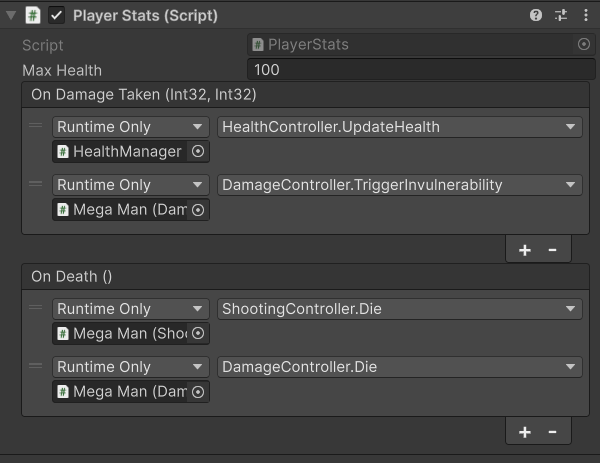
Everything appears functional, though I did learn that un-checking a component in the Unity Editor doesn’t disable the entire script, just Update(). Kind of weird, but whatever.
Up Next
I want to start learning about ScriptableObjects, especially for my enemies. So my next task will probably be to break enemies into components and have them use ScriptableObjects as well.
That said, I’ll be in England the next two weekends, so likely no progress for at least 3 weeks. No one reads this anyway, so whatever.
 Learning Unity 2D
Leave a comment