Paralysis resolved. Progress made.
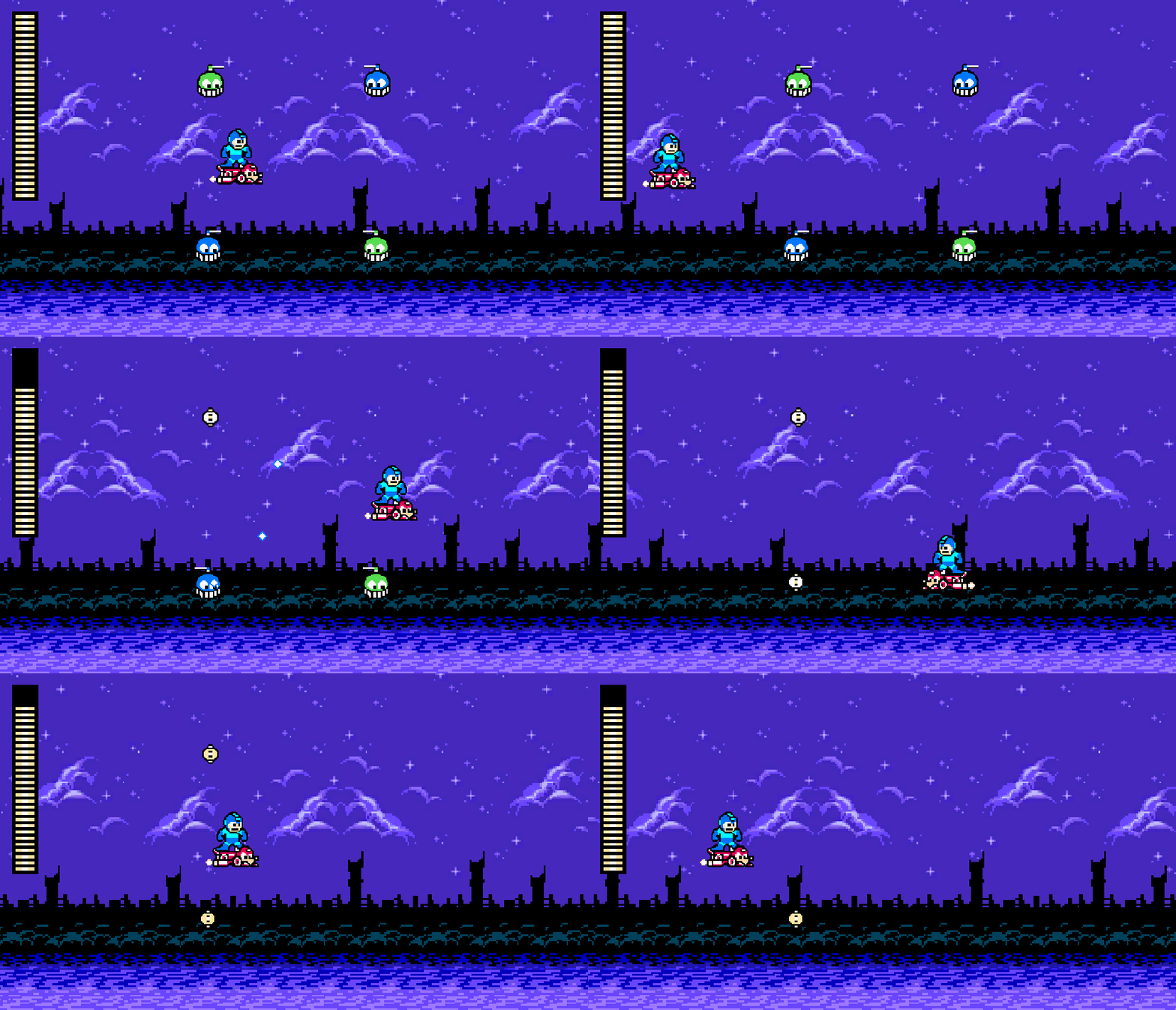
New stuff:
- Enemies face the player.
- Health drops! Note that I cranked it up to a 50% chance to capture the gif above.
Enemy Refactoring
My previous post details some of the analysis paralysis I was having, but I have resolved that. Here is that commit.
Enemies used to do everything by inheritance structure, and each Enemy had only a single MonoBehaviour script it in that handled everything. The inheritance took care of a lot of stuff so the implementation only had to do so much, but as more enemies get added, the object hierarchy only gets more complex and convoluted. Oh, I need a new abstract method on the base Enemy class? Well, I guess I have to update literally every single enemy…
So, I have a new prefab for my two (currently) enemies. This prefab is one object with a child “gun” object. In the future, I will have enemies with multiple weapons that are positioned in different places on the sprite, so it’s easier to just have child objects to position where it fires from. This new prefab now has a variety of components, broken off from the original inheritance structure:
- On the parent object:
EnemyHealthController– manages health and damage of the enemy.FacingPlayer– new functionality, responsible for making sure the enemy is facing the player.ItemDrop– responsible for dropping an item after death.
- On the child gun object:
ConstantShooter– responsible for firing projectiles constantly. There will likely be various different shooting components (e.g. clamshell enemies shoot only when open). For now, just this one.
These components use ScriptableObject data, as well. Specifically, EnemyHealthController uses an implementation of EnemyData (since it has health), ConstantShooter uses an implementation of ShooterData (which implements EnemyData), and ItemDrop uses a DropRateData.
Lots of advantages to this new model:
ScriptableObjectscan save on memory since all of the same enemy pull from the same data.- If I don’t want an enemy to do something (e.g. drop items), I just don’t add that component to it. Easy.
- Adding enemies, as long as the component is there, is as simple as making a
ScriptableObjectand adding whatever components I need. If I need different functionality, I just don’t include one of the existing components and write a new one, since everything is nicely decoupled. - Child gun objects can be placed anywhere on the prefab, so it can now fire from anywhere.
You can look at the commit, and examine the classes that were removed (Enemy, Chopper, ChopperBlue, ChopperGreen) and those that were added (Components and Data inside Scripts/Enemies). Too much code to paste here!
Healing
Since I finished the refactoring faster than expected on Saturday, I had to decide what I wanted to do with my Sunday. I decided to add health drops. Here is the commit for this addition.
I started with a ScriptableObject for restorative items (this will also be used for weapon energy later):
[CreateAssetMenu(fileName = "RestoreData", menuName = "Items/Restore")]
public class RestoreData : ScriptableObject
{
    [SerializeField] private int amount;
    [SerializeField] private float expireTime = 10f;

    public int GetAmount => amount;
    public float ExpireTime => expireTime;
}
I followed that up by making a prefab and animation for a large and small health item. They each have a different ScriptableObject since the restore a different amount. The prefab isn’t terribly interesting, but it does have a BoxCollider2D since we need to detect Mega Man running into it. Since we do need to detect Mega Man specifically, I tagged the player prefab with the “Player” tag to make it easy.
Basically, if the player collides with a HealthItem, we fire an event to heal from my PlayerStats singleton, and the HealthController will take it from there:
private void OnTriggerEnter2D(Collider2D other)
{
    if (!other.CompareTag("Player"))
    {
        return;
    }

    PlayerStats.Instance.Heal(restoreData.GetAmount);
    Destroy(gameObject);
}
The HealthController is where most of the action takes place. As you may or may not know, when Mega Man heals in games, the world stops and his health bar fills quickly. Everyone who’s played Mega Man knows that glorious sound of collecting a heal. However, as we also know, his health is repesented by small bars, and there is no such thing as a half bar, so a smooth filling will look very un-Mega Man like.
And thus, we arrive and this beastly coroutine:
public void AddHealth(int currentHealth, int maxHealth)
{
    StartCoroutine(FillBar(healthBar, currentHealth, maxHealth));
}

private IEnumerator FillBar(Image bar, float currentHealth, float maxHealth)
{
    // Pause everything.
    Time.timeScale = 0f;

    var currentRatio = bar.rectTransform.sizeDelta.y / _originalHeight;
    var endRatio = Mathf.Clamp(currentHealth / maxHealth, 0, 1);
    while (currentRatio < endRatio)
    {
        currentRatio += Constants.HealthStep;
        bar.rectTransform.sizeDelta = new Vector2(
            bar.rectTransform.sizeDelta.x, _originalHeight * currentRatio);
        yield return new WaitForSecondsRealtime(secondsPerFillLine);
    }
    bar.rectTransform.sizeDelta = new Vector2(
        bar.rectTransform.sizeDelta.x, _originalHeight * endRatio);

    // Resume everything.
    Time.timeScale = 1f;
}
We use Time.timeScale = 0f to pause the world. While paused, we can still update the UI so long as we use WaitForSecondsRealtime instead of just WaitForSeconds. We have a fill rate of 10 lines per second (or 1 line per 0.1 seconds), and there are 30 lines in his health bar. Thus, one line is 1/30th of the height of the health bar (stored in Constants.HealthStep). So, just increase the health bar by 1/30th every 0.1 seconds until you hit the intended ratio. Once everything is done, make sure the bar is correct (it should be) and get time moving again.
Looks pretty Mega Man like to me!
Also, these items can’t stick around forever, so they have an expiration time. 70% of the way to that expire time, they begin to flash… and then poof, gone. I figured all items need this functionality, so I created a base class to deal with it. Now that I think about it though, maybe the new weapon a boss drops shouldn’t disappear… so I should probably split that into a component instead. Yeah, whoops, already forgot to componentize stuff. Brain transition is hard.
Anyway, the expire coroutine is very simple since we already has a Flash utility for the warning:
protected abstract float GetExpirationTime();

private void Start()
{
    StartCoroutine(Expire());
}

private IEnumerator Expire()
{
    var expireTime = GetExpirationTime();
    var warningStartTime = expireTime * WarningRatio;
    yield return new WaitForSeconds(warningStartTime);
    yield return Flash.DurationFlash(_spriteRenderer, expireTime - warningStartTime, 0.05f);
    Destroy(gameObject);
}
Drops
Finally, enemies need to drop stuff. I decided to make a ScriptableObject that I can use to define drop rates. That said, having a drop rate for each item didn’t make sense; only one item should drop from an enemy. So, instead, we have a single drop rate, and a pool of items that an enemy can drop. Each item in that pool is given a weight. So, the algorithm basically does:
- Should we drop?
- If yes…
- Pick a random int between 1 and the total weight of all items in the pool
- Loop through items, accumulating weight.
- Once the accumulated weight is larger than the random weight, then that’s our item.
For example, we have two items: small heal (weight 2), and big heal (weight 1). Total weight is 3.
We do Random.Range(1, 3) to get either a 1, 2, or 3.
- Imagine it’s 2. We loop over the items, and get the small heal first. Cumulative weight is 2. Since this is >= the randomly chosen one, we get a small heal.
- Imagine it’s 3. We loop over the items, get the small heal, and add 2 to the cumulative weight. However, the cumulative weight is still < the randomly chosen one, so we move onto the large healing item and add 1 more. Now it’s >= the randomly chosen one, so we get a big heal.
Anyway, the code is more concise than my description:
[CreateAssetMenu(fileName = "DropRateData", menuName = "Items/Drop Rate")]
public class DropRateData : ScriptableObject
{
    [SerializeField] private float dropRate = 0.1f;
    [SerializeField] private Drop[] drops;

    private readonly Lazy<System.Random> _random = new(
        () => new System.Random((int)DateTime.Now.Ticks));

    public GameObject GetDrop()
    {
        if (_random.Value.NextDouble() > dropRate)
        {
            return null;
        }

        var totalWeight = drops.Sum(drop => drop.Weight);

        // OK, now choose one based on the weights.
        var chosenWeight = _random.Value.Next(0, totalWeight);
        var cumulativeWeight = 0;
        foreach (var drop in drops)
        {
            cumulativeWeight += drop.Weight;
            if (chosenWeight < cumulativeWeight)
            {
                return drop.Item;
            }
        }

        return null;
    }
}
I had to do a couple extra commits (1, 2) while typing this to fix the randomness. Awake wasn’t being called at all, so _totalWeight was always zero, leading to always getting a small health. So, I swapped to calculating the totalWeight when GetDrop is called, and using System.Random with a seed (initialized lazily) instead. Seems to work!
How that we have a ScriptableObject to handle drop pools, I just made a DefaultDrops instance with just my two health items, and stuck that into an ItemDrop component added to each enemy. The component is very simple:
public class ItemDrop : MonoBehaviour
{
    [SerializeField] private DropRateData dropRateData;

    public void DropItem()
    {
        var item = dropRateData.GetDrop();
        if (item == null)
        {
            return;
        }
        Instantiate(item, transform.position, Quaternion.identity);
    }
}
… and voilà! Customizable drops (based on the ScriptableObject) for each enemy in a generic component.
Up Next
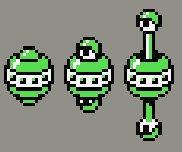
I want to make some new enemies. In particular, this guy:
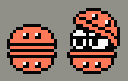
Or this guy:
They both have some unique properties:
- The each fire only when open.
- The first one…
- fires from two points.
- fires only straight, not aimed.
- The clamshell (second one)…
- is invulnerable until open.
- fires in a spread pattern.
More components, it seems! Hopefully the framework I’ve setup makes it relatively simple, but this will be the real test.
 Learning Unity 2D
Leave a comment