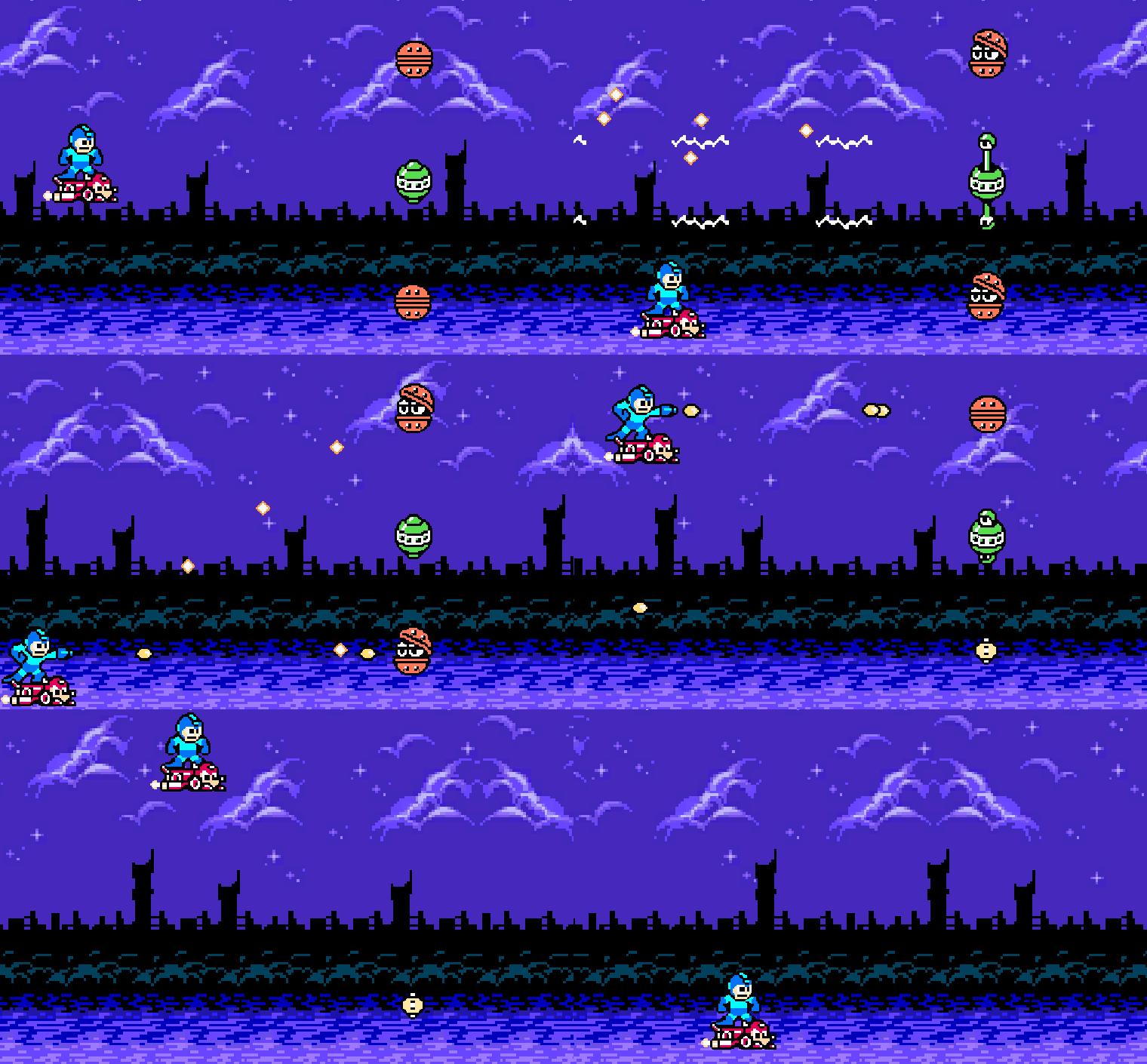
These enemies seem simple, but there were a few intricacies to doing them.
GitHub commit for these changes.
Animation State
The trickiest part of all of this, and why it took me longer to do, is that the animations of these enemies should change their collider shape. It’s not immediately obvious how to deal with this in Unity. I expected there to be a simple solution (e.g. PolygonCollider2D automatically adjusts when the sprite changes), but it appears that I couldn’t find one.
In essence, the issue is that when the sprite changes shape, so should the collider. For example, looking at the “2 Eyes” enemy (the green one), when it opens up, its entire body should be vulnerable, including the eyeballs. However, if you keep that collider shape when it’s closed, empty area above/below it will remain vulnerable when it shouldn’t be.
Initially, I thought to use animation events for this. However, events fire each iteration of the animation, which felt inefficient to me. So, after some searching and asking Gemini, I arrived at using StateMachineBehaviours, attached to specific states in the Animator. When it enters the open state animation, we re-compute the PolygonCollider2D based on the physics shape of the current Sprite in the SpriteRenderer.
Sounds doable, but I quickly learned it’s never that simple. Using OnStateEnter isn’t enough, because the sprite is updated on the last frame of the animation, and it’s not updated in the SpriteRenderer when we hit OnStateEnter on the “open” state. I ended up having to use a combination of OnStateEnter and OnStateUpdate (when the SpriteRenderer is actually updated). I still feel like there should be a simpler solution out there, but I am just missing it.
As a result, we get this wicked-looking class:
public class UpdatePolygonColliderState : StateMachineBehaviour
{
    private List<Vector2> _physicsShapeVertices;
    private bool _needsUpdate;

    public override void OnStateEnter(Animator animator, AnimatorStateInfo stateInfo, int layerIndex)
    {
        _needsUpdate = true;
    }

    public override void OnStateExit(Animator animator, AnimatorStateInfo stateInfo, int layerIndex)
    {
        _needsUpdate = false;
    }

    public override void OnStateUpdate(Animator animator, AnimatorStateInfo stateInfo, int layerIndex)
    {
        if (!_needsUpdate)
        {
            return;
        }

        var collider = animator.GetComponent<PolygonCollider2D>();
        if (collider == null)
        {
            Debug.LogError($"Missing PolygonCollider2D on {animator.gameObject.name}.");
        }

        // Get the new list of vertices and set it on the collider.
        _physicsShapeVertices ??= GetPhysicsShapeVertices(animator);
        collider.SetPath(0, _physicsShapeVertices);

        _needsUpdate = false;
    }

    private List<Vector2> GetPhysicsShapeVertices(Animator animator)
    {
        var spriteRenderer = animator.GetComponent<SpriteRenderer>();
        if (spriteRenderer == null)
        {
            Debug.LogError($"Missing SpriteRenderer on {animator.gameObject.name}.");
        }

        var sprite = spriteRenderer.sprite;
        if (sprite == null)
        {
            Debug.LogError($"SpriteRenderer on {animator.gameObject.name} has no sprite.");
        }

        List<Vector2> physicsShapeVertices = new();
        sprite.GetPhysicsShape(0, physicsShapeVertices);

        return physicsShapeVertices;
    }
}
The good part here is that this’ll work for most future animations. It’s not specific to any particular sprites. So, I was able to utilize this StateMachineBehaviour for the clam enemy too. Some notes on the code:
_physicsShapeVerticesis used to store the vertices in memory so we don’t have to re-compute them each time we enter the state._needsUpdateis used to avoid constantly resetting the collider shape every sampling of the animation.- I’m utilizing
Sprite.GetPhysicsShapeto grab the vertices, then using those vertices for thePolygonCollider2D‘s path.
While this seemed tedious, it did teach me about StateMachineBehaviours, and I was able to use that knowledge to help me transition an enemy from invulnerable to vulnerable state. Both of the new enemies use this (though I might change 2 Eyes to always be vulnerable). These two state behaviours flip a flag in the EnemyHealthController that controls vulnerability. If invulnerable, we ricochet the bullet and disable its collider (so it doesn’t destroy any enemies on the ricochet). Technically, in Mega Man, it ricochets at a 45 degree angle up… but I made it a bit more random. I think it’s cooler that way.
New Enemies
I don’t know official names of things, so I gave them arbitrary descriptive names: 2 Eyes and Clam.
2 Eyes
This is my first enemy with two guns. It also only fires once when open. So, rather than being a constant shooter, I created a ConstantEventShooter class, along with some additional properties in the ShooterData. It uses the fireRate properties, but instead of shooting at that rate, it “opens” up, triggering an animation. There is a configurable delay before it fires (compensating for the animation), and a time for how long it stays open.
The big difference is that when it fires, it instead invokes an event. The guns subscribe to the event and fire in sync with each other as a result. So, the guns have an EventShooter class as well. I couldn’t figure out a way to control this exclusively on the guns like the ConstantShooter because I need them to stay in sync (controlled by the event on the parent object), so we have two classes instead: one on the parent, and one on each gun.
I also wanted a projectile that went straight, but towards the player. I had one that went straight with an initial direction, but I wanted that direction to be based solely on the player’s positioning. Thus, StraightProjectileTowardsPlayer was born. I’ll try to figure out a way to coalesce some of these projectiles together… and I need to namespace them too.
Clam
Once 2 Eyes was written, Clam required zero code. With everything componentized at this point, I just had to make the animator, setup states, and add the appropriate components to the prefab. And thus, Clam is born.
I think I’ll probably adjust its firing style to be a spread of bullets instead of a cluster, like in Mega Man. Perhaps next commit.
Up Next
I might make a couple more simple enemies and a couple more encounters.
However, after that, there are a few directions I could go:
- Boss. Cut Man.
- Play with tile sets and make levels something you navigate through, like Gradius.
- Move UI to the bottom so it’s not on the playable area. Add scoring.
- “Start” animation to begin a stage.
- Stage select.
I’m leaning towards #3, then #1. I think before I do a boss, I need a place to put its health… and allocating some space at the bottom for it, outside of the playable area, seems like a prerequisite for that.
 Learning Unity 2D
Leave a comment